
Andonstar AD407 Pro Review
Andonstar AD407 Pro
⚡ Quick Verdict
🔍 1. Overview
Traditional stereo microscopes have been the gold standard for PCB repair for decades—but digital microscopes are rapidly gaining ground. The Andonstar AD407 Pro represents a new generation of inspection tools that combine affordability with features that simply aren't possible with optical scopes.
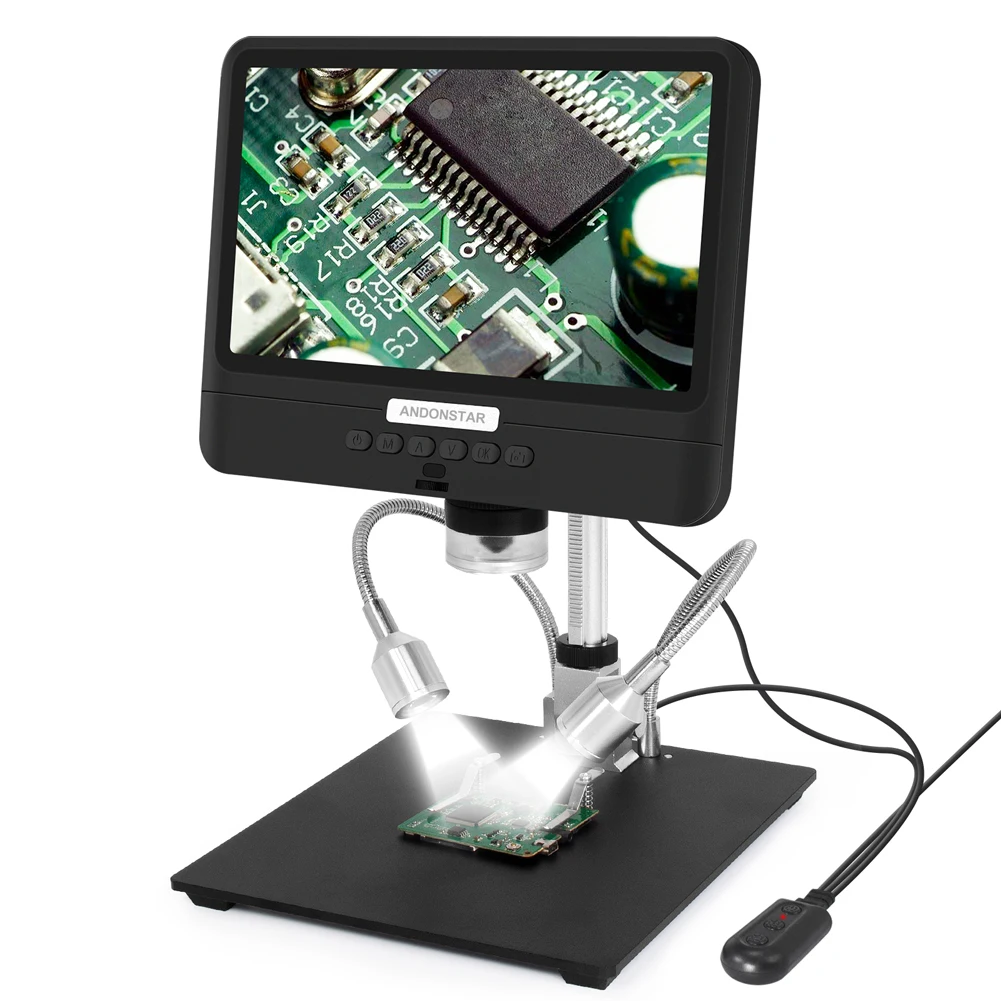
Instead of looking through eyepieces, you work from a 7-inch LCD screen. This might sound strange to traditionalists, but it offers real advantages: no eye strain from prolonged viewing, the ability to share your screen with trainees, and easy photo/video documentation of your repairs.
At $199, the AD407 Pro sits at the top end of the "budget digital microscope" category. The question is: does it deliver professional-grade performance for PCB soldering, or should you save money with the AD208? We tested both to find out.
✨ Key Highlights:
- 🔹 7-inch LCD screen: 1080P resolution, no eyepiece strain
- 🔹 HDMI output: Connect to larger monitor for detailed work
- 🔹 12MP sensor: 1080P video recording, photo capture
- 🔹 50X-1200X magnification: Covers SMD to component-level inspection
- 🔹 Flexible gooseneck stand: Position at any angle
- 🔹 Remote control: Adjust settings without touching the scope
📊 2. Specifications
📦 3. Unboxing
Box Contents:
- ✅ AD407 Pro microscope unit with 7" screen
- ✅ Flexible gooseneck stand with metal base
- ✅ HDMI cable
- ✅ USB power cable
- ✅ AV cable
- ✅ IR remote control (batteries included)
- ✅ Lens cleaning cloth
- ✅ User manual
- ✅ MicroSD card adapter
First impressions: The AD407 Pro feels more substantial than budget digital microscopes. The screen is bright and clear, the gooseneck stand holds position well, and the build quality is decent for the price. Assembly is simple—screw the scope onto the stand, plug in USB power, and you're ready to go. Total setup time: 3 minutes.
🔧 4. Build Quality
Materials
The main scope body is plastic but feels solid. The screen housing is reinforced plastic with a matte finish. The gooseneck stand is metal with rubberized coating, and the base is heavy enough to prevent tipping. Not premium, but appropriate for the price.
Screen Quality
The 7-inch 1024x600 LCD is bright with good viewing angles. Colors are slightly oversaturated but acceptable. The anti-glare coating works well even under bright shop lights. Touchscreen would be nice but isn't expected at this price.
Controls
Buttons on the scope include power, menu, up/down, and snapshot. They're rubberized and responsive. The included IR remote is surprisingly useful—you can adjust zoom, brightness, and capture photos without touching the scope.
Stand Flexibility
The gooseneck stand is the standout feature. It holds position firmly but is easy to adjust. Working distance can be varied from about 100mm to 150mm by bending the neck. The metal base has non-slip feet.
⚡ 5. Performance
Testing Methodology
We tested the Andonstar AD407 Pro for 3 weeks in an active phone repair shop, performing:
- 🔬 SMD soldering (0402, 0603 components)
- 🔬 iPhone charging port replacements
- 🔬 Microsoldering on logic boards
- 🔬 Inspection of solder joints and PCB traces
Performance Metrics
Clear, bright image on the built-in screen. Good for soldering, excellent for inspection. Some slight color fringing at extreme edges.
Zero lag on external monitor. 1080P output is crisp and clear. This is where the AD407 Pro really shines—perfect for training or detailed work.
100-150mm working distance is adequate for soldering. You'll occasionally bump the scope with your iron, but the gooseneck adjusts easily.
8 LED ring light is adjustable and bright enough. Even illumination across the field, though very shiny surfaces can cause hotspots.
📱 iPhone Charging Port Replacement
The AD407 Pro made this job significantly easier. With the screen positioned directly above the work area, we could see the tiny soldering points clearly without hunching over.
📱 2-Hour Continuous Soldering
Eye strain was minimal compared to optical microscopes. Being able to sit upright and look at a screen at eye level is a game-changer for long repair sessions.
📱 HDMI to 55" TV for Training
Connected to a large TV, the AD407 Pro became an excellent training tool. Students could see every detail of the soldering process. Zero lag made it usable for live demonstrations.
⚖️ 6. Pros & Cons
✅ Pros
- Ergonomic viewing: No hunching over eyepieces
- HDMI output: Zero lag, perfect for large monitors
- Flexible gooseneck: Position scope exactly where needed
- Built-in recording: Capture photos/video to SD card
- Remote control: Adjust settings without touching scope
- Good magnification: 50X-1200X covers all repair needs
- Affordable: Under $200 for a complete system
❌ Cons
- Working distance: 100mm is tight for some tasks
- Plastic construction: Doesn't feel as premium
- Interpolated sensor: 12MP is marketing
- Screen resolution: 1024x600 is adequate but not retina
- No battery: Requires USB power at all times
- MicroSD not included: Need to buy separately
📊 7. AD407 Pro vs AD208
We found an interesting alternative on AliExpress—the Andonstar AD208. At nearly half the price, is it a better value? Here's how they compare:
🏆 Winner: Depends on Your Needs
Choose AD407 Pro if: You need HDMI output, flexible positioning, and fast shipping. The gooseneck stand and remote control make it more versatile for professional use.
Choose AD208 if: Budget is your primary concern and you can wait for shipping. The larger 8.5" Full HD screen is actually better than the AD407 Pro's, but you lose HDMI output and flexibility.
⏱️ Long-Term Durability
After three months, the AD407 Pro is still going strong. The only issue we encountered was the gooseneck becoming slightly looser over time—easily fixed by tightening the adjustment ring. The screen is still bright, the HDMI output works perfectly, and no dead pixels. For a $199 digital microscope, durability has been impressive.
👥 User Reviews
"I switched from a stereo microscope to this digital scope and haven't looked back. My neck pain is gone, and the HDMI output to a 32" monitor is incredible for detailed work. Best $200 I've spent on my shop."
"Great for soldering, but the working distance took some getting used to. I wish it had a bit more room between the lens and the board. The image quality is excellent for the price though."
"Bought this for training new technicians. Being able to show them what I'm seeing on a big screen is invaluable. The remote control is surprisingly useful too."
💡 Pro Tips
Use HDMI
For microsoldering, connect to a large monitor (24"+). The extra screen real estate makes a huge difference.
Adjust Lighting
The ring light can cause glare on shiny boards. Tilt the scope slightly or reduce brightness.
Use the Remote
Keep the remote handy for snapshots and zoom adjustments during soldering.
Mark Focus
Mark the focus wheel with a white dot at your preferred working distance for quick return.
🧹 Maintenance
Daily
- Dust off lens with compressed air
- Wipe screen with microfiber cloth
- Store with lens cap on
Weekly
- Clean lens with tissue/solution
- Check gooseneck tension
- Inspect USB cable
Monthly
- Clean LED ring lenses
- Check all screws
- Format SD card
As Needed
- Replace USB cable
- Update firmware
💰 Where to Buy
💰 Prices last updated: February 23, 2024
🛠️ Accessories


🏆 8. Final Verdict
Should You Buy the Andonstar AD407 Pro?
Yes, if you do any amount of PCB soldering. The AD407 Pro is the best digital microscope under $200 for repair work. The combination of a built-in screen, HDMI output, and flexible gooseneck stand makes it incredibly versatile. For professional technicians, the HDMI output alone justifies the price—being able to work from a large monitor is a game-changer.
Compared to the AD208 on AliExpress, the AD407 Pro offers better flexibility with its gooseneck stand and remote control, plus the invaluable HDMI output. While the AD208 has a larger Full HD screen, the lack of HDMI makes it less suitable for professional work. The $107 price difference is worth it for the added features.

